
Self-Hosted Deployments
Manifest offers a self-hosted version of the platform to support enterprises where security requirements prohibit use of the Manifest Cloud Platform. Manifest uses a deployment of Kubernetes to manage the applications and services required to run the platform. In addition to Manifest's first-party software, several third-party tools are also installed to provide services such as certificate management and object storage.
The self-hosted distribution is designed for a single-host deployment: one Linux VM or physical server runs the k3s control plane, the Manifest applications, and supporting services. Installation and lifecycle operations are driven by the manifest-installer CLI, which runs on that same host.
Architecture Overview
This diagram shows where data processed by the Manifest platform resides. Everything inside "Customer host" runs on infrastructure the customer controls, and SBOMs, vulnerability findings, and artifacts never leave it. The arrows crossing that boundary are the only network paths that exist, and most of them are optional and off by default.
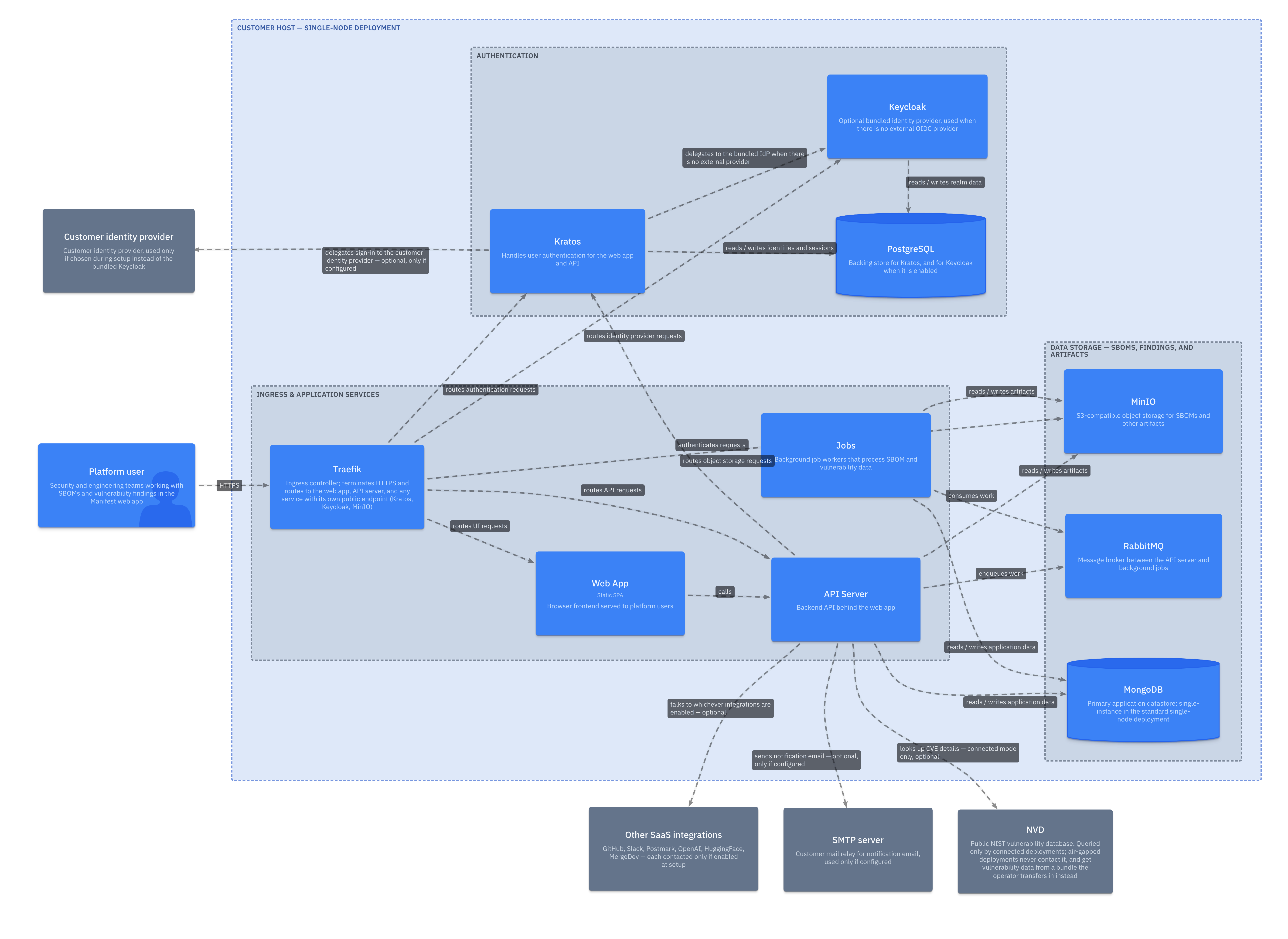
Air-gapped deploymentsIn an air-gapped deployment, none of the optional calls above happen. Vulnerability data instead arrives as a bundle the operator transfers in on their own schedule, and there's no NVD lookup at all.
Table of Contents
- Requirements - Host and network requirements
- Credentials - Required credentials for installation
- Installation - Step-by-step single-host install with
manifest-installer - Configuration Reference - Setup wizard values, day-2 configuration changes, storage, and OIDC setup
- Encryption & Key Management - Encryption standards, BYOK, key rotation, and key access control
- DNS Configuration - Required DNS records (configure before completing installation)
- Firewall Configuration - Outbound access required for installation and runtime
- Post-Install - First login and certificate trust
- Upgrade - Upgrade an existing install to a newer release
- Air-Gapped Deployments - Install on hosts that cannot reach the internet
- Troubleshooting - Common issues and solutions
- Self-Hosted v1 (Legacy) - Documentation for the superseded v1 installer generation
Support
For additional assistance, contact Manifest Cyber support:
- Email: [email protected]
Updated 3 months ago