
Release Notes Log
Manifest's release notes provide updates about the newest functionality available to our users. For any questions, reach out to Mike McDonel at [email protected] for support.
August 24, 2026
Manifest Supplier Risk
Manifest Supplier Risk gives you continuous, evidence-based visibility into vendor software, before and after procurement. Instead of one-time questionnaires or static risk scores, Supplier Risk inventories each vendor's software dependencies, assesses vulnerability and exploitability, and monitors them on an ongoing basis so risk doesn't go stale the day a contract is signed.
What this means for your team:
- Automate software bill of materials (SBOM) collection from vendors through a secure sharing portal, so your team stops chasing spreadsheets and PDFs
- Generate an SBOM directly from a compiled binary when a vendor can't or won't provide one, closing coverage gaps regardless of supplier maturity
- Get notified the moment a new vulnerability emerges in vendor software you've already approved, so you can act before it becomes an incident
- Hold suppliers accountable to remediation timelines with a persistent, auditable record instead of a point-in-time assessment
Supplier Risk is now generally available. Cummins, Boston Scientific, and Shift5 have been running it in beta.
July 7, 2026
Manifest Insights Agent (MIA)
Manifest Insights Agent (MIA) is an AI-powered analyst built into the Manifest Platform. Give MIA any supply chain indicator, a component name, a version range, or a full advisory, and it returns blast radius analysis against your actual software inventory in seconds instead of the hours it usually takes to manually cross-reference inventories, SBOMs, and vendor data.
What this means for your team:
- Query tens to hundreds of components at once, including packages that haven't yet landed in a vulnerability database
- Get back every impacted asset, product, and environment, the installed versions, and the reason each one matched
- Move from investigation to action faster during incident response, without assembling the exposure picture by hand first
- Access MIA as a Model Context Protocol (MCP) server, so exposure analysis can run inside CI/CD pipelines and incident runbooks, not just the platform UI
MIA is an analyst you engage when you have a question. It does not run continuously or alert on new findings the way a scanner does.
Manifest Insights Agent Documentation
June 4, 2026
Foreign Risk
Manifest Foreign Risk analyzes the contributors behind your open source components to surface potential foreign ownership, control, or influence exposure across your software supply chain. It evaluates components against 18 risk categories, including government affiliation, sanctions, and restricted entities, then delivers a policy-based risk assessment directly in your asset view.
What this means for your team:
- Get visibility into foreign influence risk in your open source dependencies without manual research
- Configurable policies let you define what risk thresholds matter for your organization
- Built for teams with compliance requirements around foreign software exposure, particularly in defense and regulated environments
Foreign Risk will appear on your Asset overview page automatically once enabled. No changes to your existing SBOM workflows or uploads are required.
Contact your Manifest account team at [email protected] to request access.
March 27, 2026
Product Hierarchy (Coming April 13)
You can now build a product hierarchy to organize your software inventory. Group assets and sub-products under a parent product to reflect how your software is actually composed and shipped.
What's new
Inventory tab
A new Inventory tab on the Product Details page shows a collapsible tree view of all sub-products and assets within a product, including name, version, supplier, vulnerability count, and labels.
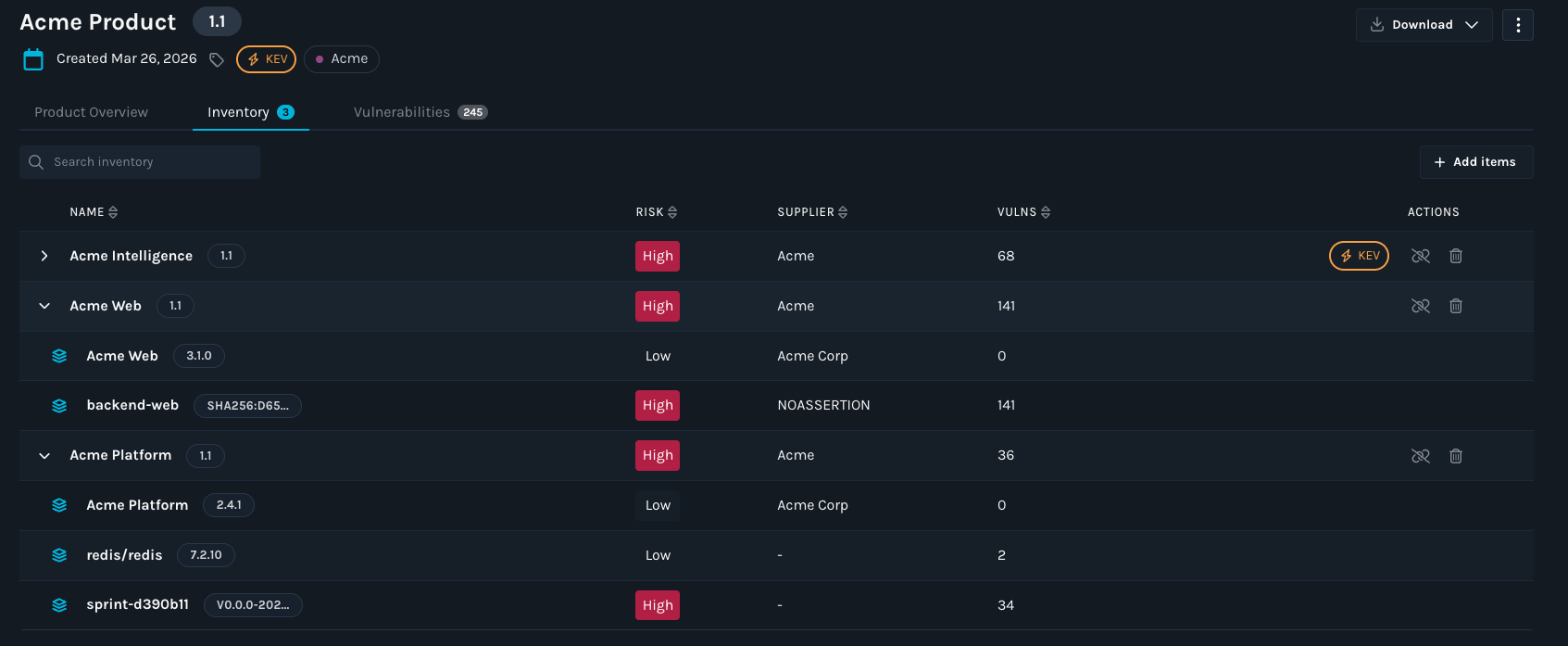
Add and remove items
Use the new Add Item button in the Inventory tab to add assets or sub-products to any product. Select and remove items directly from the tree view.
Vulnerability rollup
Vulnerabilities found in a component automatically surface on every parent product above it, giving your team immediate visibility into blast radius without manual investigation.
Shared sub-products
Sub-products can be linked to multiple parent products. One patch tracked once, visible across every product that uses it.
API support
Add, remove, and view sub-products programmatically using the new Inventory Management APIs.
For more information on building your Product Hierarchy, see documentation here: https://docs.manifestcyber.com/update/docs/creating-a-product-hierarchy
February 10, 2026
Enrichment Engine Beta Update
Manifest has improved the existing SBOM enrichment capabilities in the platform with Enrichment Engine Beta Update. This capability enhances SBOMs at upload time, adding data such as licenses, descriptions, suppliers, and package identifiers. This release addresses prior reliability issues and increases enrichment coverage by 4.5X. The Enrichment Engine update now adds PURL and CPE identifiers to SBOMs when they are not present, allowing components to be more accurately matched to vulnerabilities.
During enrichment, Manifest will:
- Automatically add and normalize key component metadata such as pURLs, CPEs, author/maintainer attribution, VCS URLs, hashes, supplier locations, release date, and license data, and will augment each component with End-of-Support (EoS) and Level-of-Support signals to improve consistency across both component identification and vulnerability matching.
- Fix existing inaccurate package identifiers.
- Expand support for identifying vulnerabilities in Nix-based packages.
- Apply enrichment by default for SBOMs uploaded via the UI, API, or CLI (configurable).
Why it matters
Accurate vulnerability mapping depends on high-quality SBOM data. The Enrichment Engine Beta Update reduces noise, improves consistency, and ensures that security teams can trust the results they see, especially when managing large or diverse software inventories.
Adding supplier (author/maintainer) attribution and license data strengthens this further by improving component identity resolution and enabling governance workflows:
- Supplier data helps distinguish similarly named packages, validate provenance, and route remediation to the right owner or vendor.
- License data supports compliance and policy enforcement, and it provides critical context for third-party risk decisions alongside vulnerability findings.
Vulnerability findings become more accurate and in some cases can reduce false positives and even avoid false negatives, which can reduce triage efforts.
How to use it
- Work with your Manifest Success Rep to enable the feature: [email protected]
- Go to Upload Settings and ensure “Enrich SBOMs by default” is enabled.
- If uploading SBOMs manually, check “Enrich SBOMs” during upload.
- SBOMs uploaded via the CLI will automatically take advantage of enrichment when enabled at the organization level.
Note: This capability is currently in Beta and may change prior to general availability.
Binary Analysis (Beta)
Manifest now supports Binary Analysis (Beta), allowing customers to analyze compiled software artifacts directly. Binary Analysis transforms opaque third-party software into something observable, measurable, and continuously monitorable.
With Binary Analysis, you can:
- Identify what’s actually inside third-party binaries.
- Generate and continuously enrich SBOMs directly from binaries.
- Detect newly disclosed vulnerabilities in deployed components.
- Reduce supply chain risk by uncovering hidden or outdated dependencies.
- Hold suppliers accountable with evidence-based insights.
Why it matters
Security teams often rely on incomplete or outdated SBOMs from vendors. Binary Analysis is useful in cases where SBOMs are difficult to obtain and helps to close that gap by validating software composition directly from the shipped artifact.
Note: For the best and most comprehensive results, Manifest encourages all customers to use original SBOMs from vendors wherever possible.
How to use it
- Work with your Manifest Customer Success Rep to enable the feature: [email protected]
- Upload a binary via the Uploads page or API (one binary at a time).
- Manifest analyzes the binary via the OEM pipeline and generates an SBOM.
- The generated SBOM is automatically uploaded into Manifest for monitoring and enrichment.
Requirements and limitations
- Maximum file size: 2 GB
- Analysis time: up to ~10 minutes, depending on file size
- Supported languages (Beta):
- Python
- TypeScript
Token Management DEPRECATION Update: Org Tokens → User Tokens
Deprecation Notice: As of April 1st, 2026, Manifest Org tokens will be deprecated.
What will change
- Org tokens will be deprecated in favor of user tokens on April 1st, 2026.
- API and CLI usage will require a user token.
Why it matters
User tokens improve security, traceability, and access control by ensuring that actions taken via the API or CLI are attributable to a specific user rather than a shared organization credential.
What you need to do
- Generate a user token from your user settings.
- Update any existing API integrations, CI/CD pipelines, or CLI configurations to use the new user token.
- Validate that automation continues to function as expected after the update.
November 3, 2025
We’ve made it easier to understand the risk of open-source repositories before adding them to your software and inventory. You can now analyze any public repository hosted in GitLab or GitHub by simply copying and pasting its URL into Manifest.
During import you’ll be able to:
- Choose the version of the repository to analyze (e.g. latest or a specific version).
- Set the status of the imported SBOM as active or inactive, depending on your needs.
Why it matters
Secure development begins with choosing open-source libraries that match your risk appetite and are free of known vulnerabilities. Assessing library risk upfront strengthens long-term security and avoids costly patching and incident response later.
How to use it
- Go to Uploads → Import OSS in the upper right corner
- Paste the GitHub/GitLab URL (branch defaults to main if unspecified).
- Choose between Latest or specify a version.
- Pick desired import status: Active or Inactive.
- Click Import.
October 9, 2025
Manifest is rolling out Expanded License Coverage, Customizable License Approval Statuses, and Policies.
We’ve significantly upgraded our license management capabilities to help your teams stay ahead of compliance and policy risks. You now have access to a more robust license detection capability and also have the ability to define custom policies that align with your organization’s needs.
Why these changes matter:
14× more license coverage: We’ve integrated with an industry-standard Open Source license database, expanding license detection coverage to over 2,000 licenses.
Customizable alert statuses: Easily classify licenses as Approved, Review, or Forbidden based on your organization’s compliance policies. Manifest has provided default statuses for all licenses.
License data export: Manifest lets you export a comprehensive license CSV that includes each license and its associated alert status, for any product. This enables seamless sharing of compliance evidence across legal and security workflows.
Organization-wide policies: Create org-level policies that automatically email the right people when a newly uploaded SBOM violates your vulnerability or license thresholds (e.g., CVSS, CISA KEV, license status/type).
Admins can configure policies under Settings → Organization → Policies — ensuring your organization stays informed and compliant with every SBOM upload.
Note: Policy and license status changes apply to SBOMs uploaded after updates are made.
August 12, 2025
Manifest now allows customers to upload first and third-party AIBOMs, enabling centralized visibility and streamlined risk assessments alongside existing SBOMs. Additionally, the new Models tab on the Asset page highlights instances where AI models are detected within traditional SBOMs, providing deeper insights into AI components across your software supply chain.
How it works
Step 1: Head to the Uploads page at https://app.manifestcyber.com/
Step 2: Upload AIBOMs the same way you upload any SBOM
Step 3: Once uploaded, click on the resulting uploaded asset
Step 4: See the list of detected models on the ‘AI models’ tab
Alongside this release, we have announced Manifest AI Risk, our newest product module. AI Risk continuously monitors both open-source and custom models to enable AI governance policy enforcement, risk reduction, and ensure responsible AI development. Please see here for an example of the model analysis enabled with Manifest AI Risk.
August 11, 2025
As announced in Q2, we’re excited to transition from organization-level tokens to user-level tokens this quarter! User-level tokens add more granularity and result in better security for critical integrations and API driven workflows.
What’s changing?
Starting now, users will no longer be able to create new organization-level tokens.
Existing organization-level tokens will continue to work until they expire.
Once your last organization-level token expires, this feature will be fully deprecated.
What do you need to do?
Begin creating and using user-level tokens for all new integrations.
Step 1. Go to Settings -> Account -> API Tokens
Step 2: Click ‘Create new token’
Step 3: Enter the required details and select the minimum scopes needed for the token you are creating
Review your current tokens and plan to migrate any workflows that rely on organization-level tokens before they expire.
Why this change?
User-level tokens are generally better security practice, provide better traceability, and easier management.
Updated 18 days ago